FTSData — spectral and interferogram cubes
FTSData (and its parents SingleSidedOpdData / SpecData) are the output containers
produced by the kidsdata spectroscopy pipeline. They wrap a
multi-dimensional data array together with a full WCS, per-pixel
uncertainty, mask, and hit-count map.
Note
This documentation covers the standalone ftsdata distribution. Install it
with pip install -e . from the repository root (or pip install ftsdata once
it is released). When kidsdata is installed, SpecData.correct_opacity() uses
kidsdata.forward_model.ATM automatically; otherwise pass a model explicitly
with its atm= argument. The old kidsdata.ftsdata import path remains
available through a compatibility shim.
Class hierarchy
        %%{init: {'theme': 'base', 'themeVariables': {'primaryColor': '#2980b9', 'primaryTextColor': '#fff', 'primaryBorderColor': '#1a5276', 'lineColor': '#555', 'secondaryColor': '#85c1e9', 'tertiaryColor': '#d6eaf8', 'clusterBkg': '#d6eaf8'}}}%%
classDiagram
    direction TB

    class NDDataArray {
        <<astropy>>
        +data, uncertainty, mask, wcs, meta, unit
    }

    class HitsMixinClass {
        +hits : ndarray
    }
    class WeightMixinClass {
        +weights : ndarray (inv-variance)
    }
    class HDUMixinClass {
        +to_hdu()
    }
    class IdiaMixinClass {
        +to_dset()
    }

    class OpdAxisMixinClass {
        +opd_axis
        +naxis_opd
        +opd_wcs
        +_opd_max
        +_is_doublesided / _is_onesided
    }
    class SpectralAxisMixinClass {
        +spectral_axis
        +spectral_bins
        +spectral_wcs
        +get_ils_kernel()
        +to_itg()
    }

    class SingleSidedOpdData {
        +from_array()
        +opd_trim()
        +_to_onesided()
        +_extract_doublesided()
        +_phase_error_corrected()
        +to_spectra(apodization, phase_error_correction)
    }
    class DoubleSidedOpdData {
        +to_spectra(apodization, real=True)
        +_apodization()
    }
    class OneSidedOpdData {
        +to_spectra(apodization)
        +_apodization()
    }
    class SpecData {
        +correct_opacity()
        +correct_itg_binning()
    }
    class FTSData {
        <<retro-compat subclass>>
    }

    NDDataArray <|-- SingleSidedOpdData
    NDDataArray <|-- SpecData
    OpdAxisMixinClass <|-- SingleSidedOpdData
    SpectralAxisMixinClass <|-- SpecData
    HitsMixinClass <|-- SingleSidedOpdData
    HitsMixinClass <|-- SpecData
    WeightMixinClass <|-- SingleSidedOpdData
    WeightMixinClass <|-- SpecData
    HDUMixinClass <|-- SingleSidedOpdData
    HDUMixinClass <|-- SpecData
    IdiaMixinClass <|-- SingleSidedOpdData
    IdiaMixinClass <|-- SpecData
    SingleSidedOpdData <|-- DoubleSidedOpdData
    SingleSidedOpdData <|-- OneSidedOpdData
    SingleSidedOpdData <|-- FTSData
    SpecData <|-- FTSData
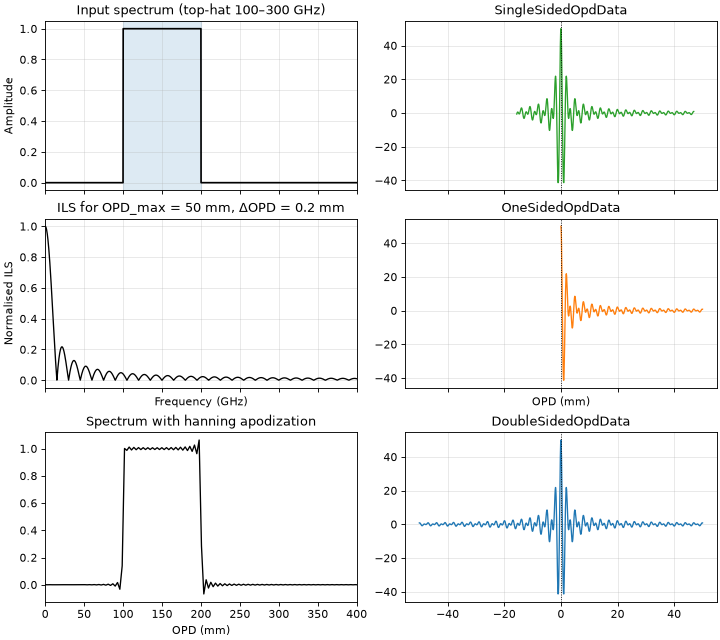
SingleSidedOpdData is the shared base for interferogram cubes (OPD axis).
Its two geometry-specific subclasses implement the direct inversions:
Class |
OPD geometry |
|
|---|---|---|
|
ZPD centred, symmetric OPD axis |
direct FFT of the full interferogram |
|
ZPD at the start, positive OPDs only |
real inverse FFT |
|
asymmetric (ZPD anywhere else) |
phase correction (optional) + extract/fold one side, then |
SpecData holds spectral cubes (frequency axis).
FTSData inherits from both SingleSidedOpdData and SpecData and exists for
backward compatibility — new code should use SingleSidedOpdData,
DoubleSidedOpdData, OneSidedOpdData or SpecData directly. Its
to_spectra keeps the generic (geometry-agnostic) implementation.
Note
OpdData is the generic entry point when the OPD geometry is unknown. It is
an alias of SingleSidedOpdData, so OpdData.from_array and OpdData.read
dispatch to the geometry-specific class. Direct construction, OpdData(...),
does not dispatch and always creates a SingleSidedOpdData.
Data model
Both classes follow the astropy.nddata.NDDataArray data model:
Attribute |
Type |
Description |
|---|---|---|
|
|
Primary data (float64 by default) |
|
|
|
|
|
|
|
|
Full WCS (RA, Dec, OPD or frequency) |
|
dict / FITS header |
Provenance and pipeline parameters |
|
|
Data unit |
|
|
Number of detector samples per voxel |
The WCS axis order follows the FITS convention (last axis = first numpy axis).
For a spectral cube the shape is (nfreq, ny, nx) with the WCS ordering
(RA, Dec, FREQ).
Constructing from arrays
SingleSidedOpdData.from_array is the standard constructor when you have raw
interferogram timelines already rebinned onto a uniform OPD grid. When called on
the base SingleSidedOpdData class it inspects the OPD geometry and returns the
matching subclass:
OPD geometry |
Returned class |
|---|---|
symmetric, ZPD centred |
|
ZPD at the first sample |
|
anything else |
|
Calling from_array on an explicit subclass always returns that subclass.
The same dispatch is applied by SingleSidedOpdData.read for FITS/HDF5 files
(while FTSData.read still returns a generic FTSData).
When the OPD geometry is not known in advance, use OpdData as the generic
entry point: it is an alias of SingleSidedOpdData, so OpdData.from_array
and OpdData.read return the matching subclass. Direct construction,
OpdData(...), does not dispatch and always creates a SingleSidedOpdData;
prefer from_array or read in that case.
import astropy.units as u
import numpy as np
from ftsdata import SingleSidedOpdData

opd = np.arange(-50, 51) * 0.1 * u.mm   # 101 OPD samples, 100 µm step
data = np.random.normal(size=(opd.size, 10, 10))   # (nopd, ny, nx)

itg = SingleSidedOpdData.from_array(opd, data)
print(type(itg).__name__)    # DoubleSidedOpdData
print(itg.opd_axis)          # Quantity array in mm
print(itg._is_doublesided)   # True
Interferogram → spectrum: to_spectra
to_spectra implements the Forman method (Spencer 2005). The exact flow
depends on the class:
DoubleSidedOpdData: direct FFT of the full (apodised) interferogram. The result is real by default; passreal=Falseto keep the complex spectrum.OneSidedOpdData: real inverse FFT of the positive-OPD interferogram.SingleSidedOpdData: optionally apply phase-error correction (phase_error_correction=True), extract/fold the longest side (_to_onesided), then delegate toOneSidedOpdData.to_spectra. This generic implementation also acceptspeakand forwards it to the one-sided inversion.
For the single-sided case:
Optionally apply phase-error correction (
phase_error_correction=True)Convert double-sided → one-sided interferogram (
_to_onesided)Apply apodisation window
Inverse FFT →
SpecData
import numpy as np

# Default: no apodisation, no phase correction
spec = itg.to_spectra()

# Hann apodisation (reduces sidelobes at the cost of spectral resolution)
spec = itg.to_spectra(apodization=np.hanning)

# Double-sided cubes: keep the complex spectrum instead of its real part
spec_complex = itg.to_spectra(real=False)

# Phase-error correction + Forman apodisation (generic single-sided path)
from ftsdata import SingleSidedOpdData, forman
spec = SingleSidedOpdData.to_spectra(
    itg,
    apodization=forman,
    phase_error_correction=True,
    niter=2,
    deg=1,
)

print(spec.spectral_axis.to("GHz"))   # frequency axis
print(spec.data.shape)                # (nfreq, ny, nx)
Key parameters of to_spectra:
Parameter |
Default |
Effect |
|---|---|---|
|
|
Window applied to the interferogram before the FFT |
|
|
Return the real part of the double-sided spectrum; |
|
|
Run enhanced Forman phase correction (generic single-sided path) |
|
|
Window used for the phase-correction iterations (generic path) |
|
|
Apodisation applied to the phase-correction function |
|
1 |
Iterations of phase correction |
|
1 |
Polynomial degree for phase smoothing |
|
auto |
Number of output spectral channels |
|
|
Zero-padding factor (overrides |
|
|
Divide the output by the number of OPD samples (legacy normalisation) |
|
|
Average both sides of the double-sided interferogram ( |
|
|
Use the longer half when folding ( |
Instrumental Line Shape (ILS)
The ILS is the Fourier transform of the OPD window. Without apodisation it is
a sinc. get_ils_kernel returns it as an astropy.convolution.CustomKernel
ready to convolve against a model spectrum:
from ftsdata import get_ils_kernel
import astropy.units as u

# 200 mm max OPD, 0.5 GHz spectral grid
kernel = get_ils_kernel(opdmax_mm=200.0, dfreq_GHz=0.5)

# Or retrieve directly from an existing SpecData
kernel = spec.get_ils_kernel()
Spectral corrections
Binning correction (correct_itg_binning)
When interferogram samples are averaged over a finite OPD bin of width
Δopd, the resulting spectrum is multiplied by sinc(ν Δopd / c).
correct_itg_binning divides by that factor:
# delta_opd is read from meta['dopd'] if set by to_spectra
spec_corr = spec.correct_itg_binning()

# Or pass it explicitly (float → interpreted as mm)
spec_corr = spec.correct_itg_binning(delta_opd=0.1)   # 100 µm bins
Opacity correction (correct_opacity)
Applies the ATM atmospheric transmission model:
import numpy as np

elev = kd.get_telescope_data("elevation")
pwv  = kd.get_telescope_data("M_pwv")

spec_corr = spec.correct_opacity(
    elevation=np.nanmedian(elev[0]),
    pwv=np.nanmedian(pwv[0]),
)
If elevation or pwv are omitted the method reads meta['MED_ELEVATION']
and meta['MED_PWV'] which are set automatically by the pipeline.
Forward model: spectrum → interferogram (to_itg)
SpecData.to_itg is the inverse operation — it turns a model spectrum
(or an existing spectral cube) back into an interferogram cube.
Useful for simulations and residual checks:
import astropy.units as u

bandpass = lambda freq_GHz: np.exp(-0.5 * ((freq_GHz - 250) / 30) ** 2)
itg_model = spec.to_itg(bandpass=bandpass, dopd_mm=0.1)
FITS I/O
FTSData / SingleSidedOpdData / SpecData are registered with the astropy unified I/O
framework. The standard read / write interface works out of the box:
from ftsdata import SpecData

# Write
spec.write("cube.fits", overwrite=True)

# Read with the matching class.  For interferograms, OpdData.read() inspects
# the WCS and returns the geometry-specific subclass.
spec = SpecData.read("cube.fits")
The FITS file layout:
Extension |
Content |
|---|---|
PRIMARY |
Data cube + WCS header |
MASK |
Boolean mask (uint8) |
UNCERT |
Uncertainty array |
HITS |
Hit map (uint32) |
Use compress=True to write tiled-compressed FITS (slower write, much smaller
files for sparse cubes):
spec.write("cube.fits", compress=True, overwrite=True)
IDIA HDF5 format
For visualisation in CARTA, write the IDIA HDF5 schema
directly through the registered hdf5 format:
from ftsdata import OpdData

spec.write("cube.hdf5", mip_levels=[2, 4, 8], dtype="float32")
spec = OpdData.read("cube.hdf5")   # returns the matching geometry subclass
The .hdf5 (or .h5) extension selects the writer automatically; pass
format="hdf5" when the filename has another extension. The writer stores the
datasets in the /0 group with the VERSION attribute required by the IDIA
schema, and accepts the same options as to_dset() (mip_levels, planes,
dtype, compression keywords, …). to_dset() remains available when you
need the raw datasets and attributes, for example to feed another storage
backend.
Combining cubes
ftsdata_average co-adds a list of cubes using per-pixel inverse-variance
weighting. All cubes must share the same WCS grid:
from ftsdata import ftsdata_average

cubes = [FTSData.read(f) for f in sorted(output_dir.glob("*_T.fits"))]
combined = ftsdata_average(cubes)
combined.write("combined_T.fits", overwrite=True)
Choosing inversion parameters
This section illustrates the effect of the main to_spectra parameters on the
resulting spectrum using synthetic interferograms. All examples use a
monochromatic source at 300 GHz observed with a CONCERTO-like FTS (OPD sampled
at 25 µm).
Effect of zero-padding on the ILS
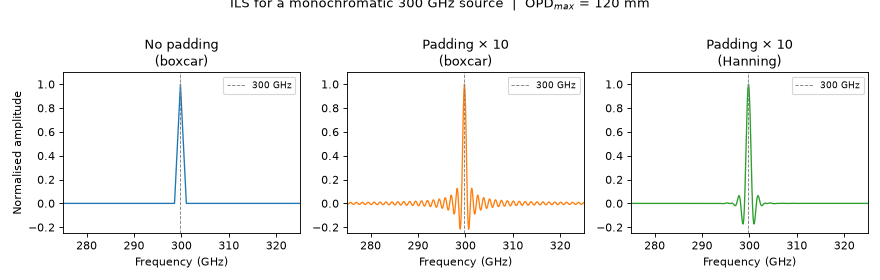
Without zero-padding the FFT returns a spectrum sampled only at the Nyquist
grid (one point per resolution element), so the shape of the Instrumental Line
Shape (ILS) is barely resolved. Adding padding (the n_pad parameter)
interpolates in frequency space at no extra information cost — it reveals the
underlying ILS shape:
Key takeaways:
n_pad=1(default) gives a coarsely sampled sinc — you see one or two points per resolution element. Usen_pad≥ 3 to properly visualise the ILS shape. For production cubesn_pad=3is a good balance between file size and frequency resolution.Hanning apodisation (
apodization=np.hanning) suppresses the sinc sidelobes but broadens the FWHM by a factor ≈ 1.6 and reduces the peak by the same factor. Integrated flux is conserved; peak flux is not.Neither padding nor apodisation adds spectral information — they only change the appearance of the ILS.
Spectral resolution vs OPD_max
The FWHM of the ILS main lobe (in GHz) depends only on the maximum OPD. For a boxcar window it is approximately:
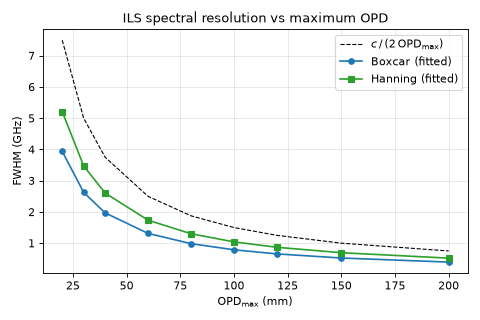
Practical guide:
OPD_max (mm) |
Boxcar FWHM (GHz) |
Hanning FWHM (GHz) |
|---|---|---|
30 |
≈ 5.0 |
≈ 7.7 |
60 |
≈ 2.5 |
≈ 3.9 |
120 |
≈ 1.2 |
≈ 2.0 |
200 |
≈ 0.75 |
≈ 1.2 |
For CONCERTO on-sky data the typical OPD range is ±120 mm, giving ≈ 1.2 GHz resolution (boxcar) or ≈ 2 GHz (Hanning).
Apodisation and peak flux
Apodisation conserves integrated flux but reduces peak flux. This matters when comparing measured line fluxes to models: always use the ILS kernel (see Instrumental Line Shape (ILS)) to convolve your model before comparing to an apodised spectrum, or compare integrated fluxes instead of peak values.
Binning correction in detail
The correct_itg_binning method (on SpecData) corrects for the spectral
distortion introduced when interferogram time samples are averaged over a
finite OPD bin of width Δopd.
Why binning distorts the spectrum
Averaging N samples inside a bin is equivalent to convolving the continuous interferogram with a rectangular window of width Δopd. In Fourier space this becomes a multiplication by the sinc:
where sinc(x) = sin(πx)/(πx). The effect is negligible at low frequencies but reaches ≈ 10 % at ν Δopd/c ≈ 0.3, and grows larger still at higher frequencies:
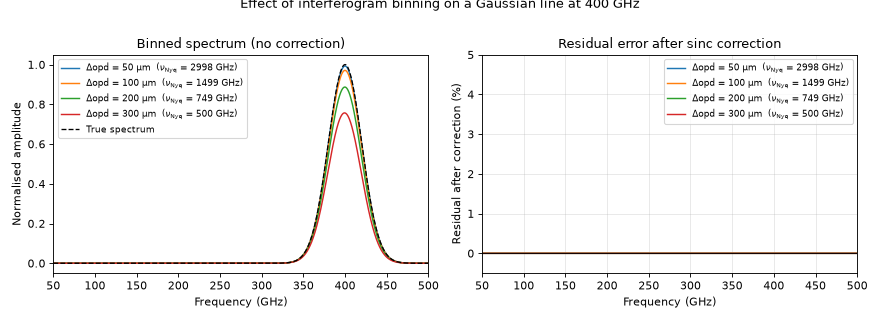
The default CONCERTO/KIDS OPD bin size is 0.1 mm (100 µm). At that setting the sinc suppression reaches ≈ 3 % at 400 GHz. With the correction the residual error is well below 1 % across the whole CONCERTO band.
Coarser binning increases SNR per bin but tightens the Nyquist frequency limit, \(\nu_{\rm Nyq} = c / (2\,\Delta{\rm opd})\):
Δopd |
ν_Nyq |
sinc at 400 GHz |
comment |
|---|---|---|---|
0.05 mm |
3000 GHz |
≈ 1.5 % |
fine mode |
0.10 mm |
1500 GHz |
≈ 3 % |
default |
0.20 mm |
750 GHz |
≈ 11 % |
coarse, correction important |
0.30 mm |
500 GHz |
≈ 25 % |
limit — 400 GHz approaches Nyquist, aliasing risk |
At 0.30 mm the Nyquist frequency falls at 500 GHz, which is the edge of the CONCERTO band. Any signal above that frequency aliases back into the band and cannot be separated from real signal — the sinc correction alone is not sufficient. Use Δopd ≥ 0.20 mm only if the high-frequency end of the band (> 400 GHz) is not scientifically critical, and always apply the correction.
Correction accuracy
The sinc correction is exact on the peak of a narrow line but accumulates second-order errors on the wings at the level of 1–5 % of the peak value. For line profile fitting, correct before fitting and use bins ≤ 0.05 mm when precision on line wings matters.
Usage
# Correction reads delta_opd from meta['dopd'] if set by the pipeline
spec_corr = spec.correct_itg_binning()

# Or pass explicitly in mm (float) or as an astropy Quantity
import astropy.units as u
spec_corr = spec.correct_itg_binning(delta_opd=0.05)          # 50 µm
spec_corr = spec.correct_itg_binning(delta_opd=50 * u.micron) # same
The method returns a new SpecData with corrected .data; the original object
is unchanged. Apply it before correct_opacity in the post-processing
chain.